Supplier relationships

SupplySync. Supplier history and risk, in one searchable record.

SupplySync is the record of who you buy from and how well they are performing: scorecards, price movement with the annual impact spelled out, credits you are still owed, compliance documents that expire, and every conversation you have had.

app.vyso.co.za/supplysync/pricing
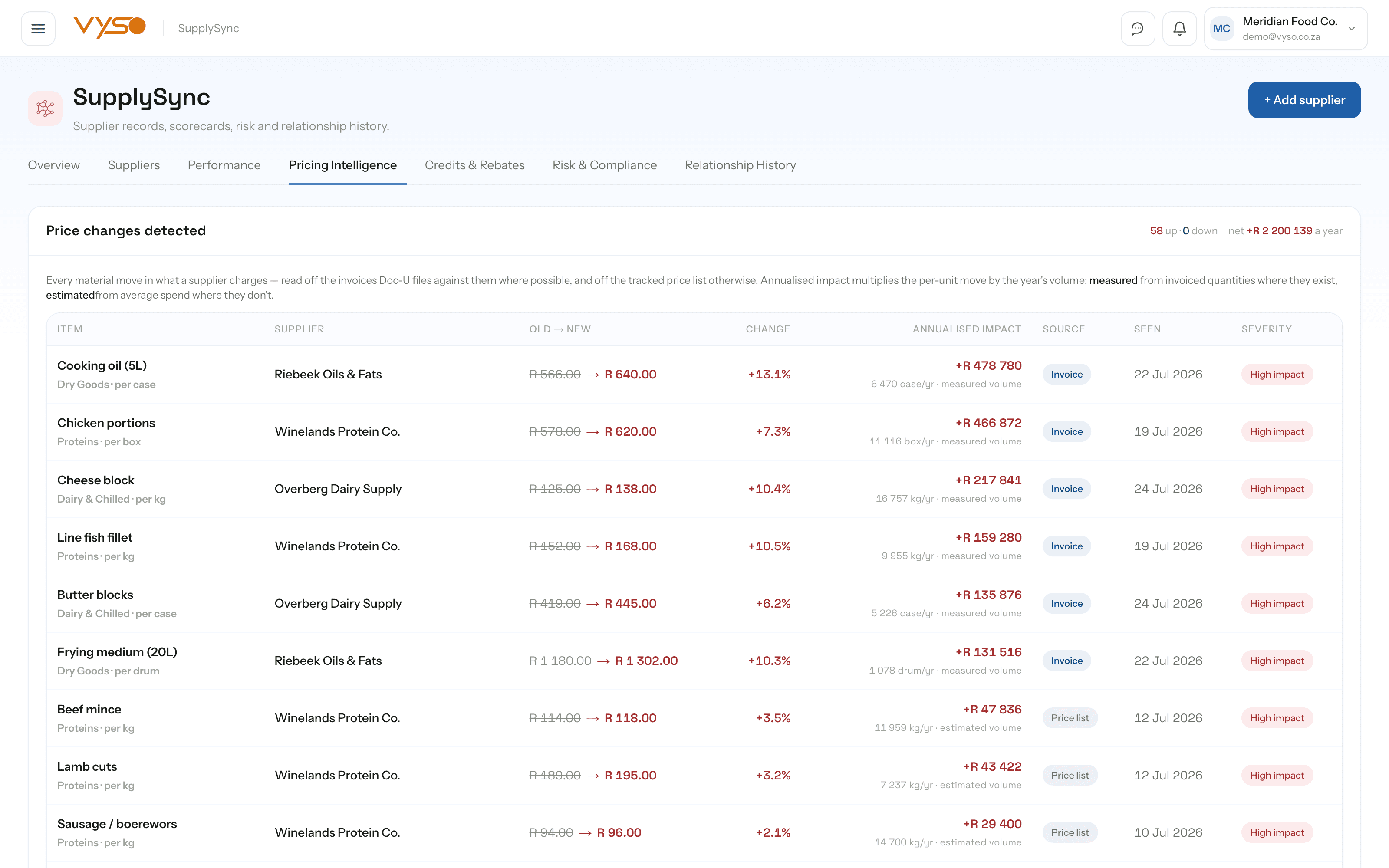
SupplySync pricing intelligence showing detected price changes with annualised impact and cross-supplier comparison.

Inside SupplySync

Feature by feature, on the real screens.

Every screen below was captured from the running platform with a demo organisation — not drawn as a mockup. The labels, columns and tiles are the ones your team would work in.

01

Every price move, with the annual cost of it

A three percent increase on one line reads as nothing and costs a fortune. Pricing intelligence detects each move as documents come in, states the old and new price, the change and its annualised impact, and then answers the follow-up question — is anyone else cheaper for the same item, and by how much a year.

  • “Price changes detected” lists Item, Supplier, Old → new, Change, Annualised impact, Source, Seen and Severity
  • “Same item, different suppliers” shows the cheapest and dearest supplier, the spread, and the annual saving from switching
  • Price watch compares each item against a market average and recommends Buy — below market, Review / negotiate or Stable
  • Buying opportunities are badged Buy now, Negotiate, Review or Watch — and hand the actual purchase back to ProcurePulse
02

The state of your supply base, in one look

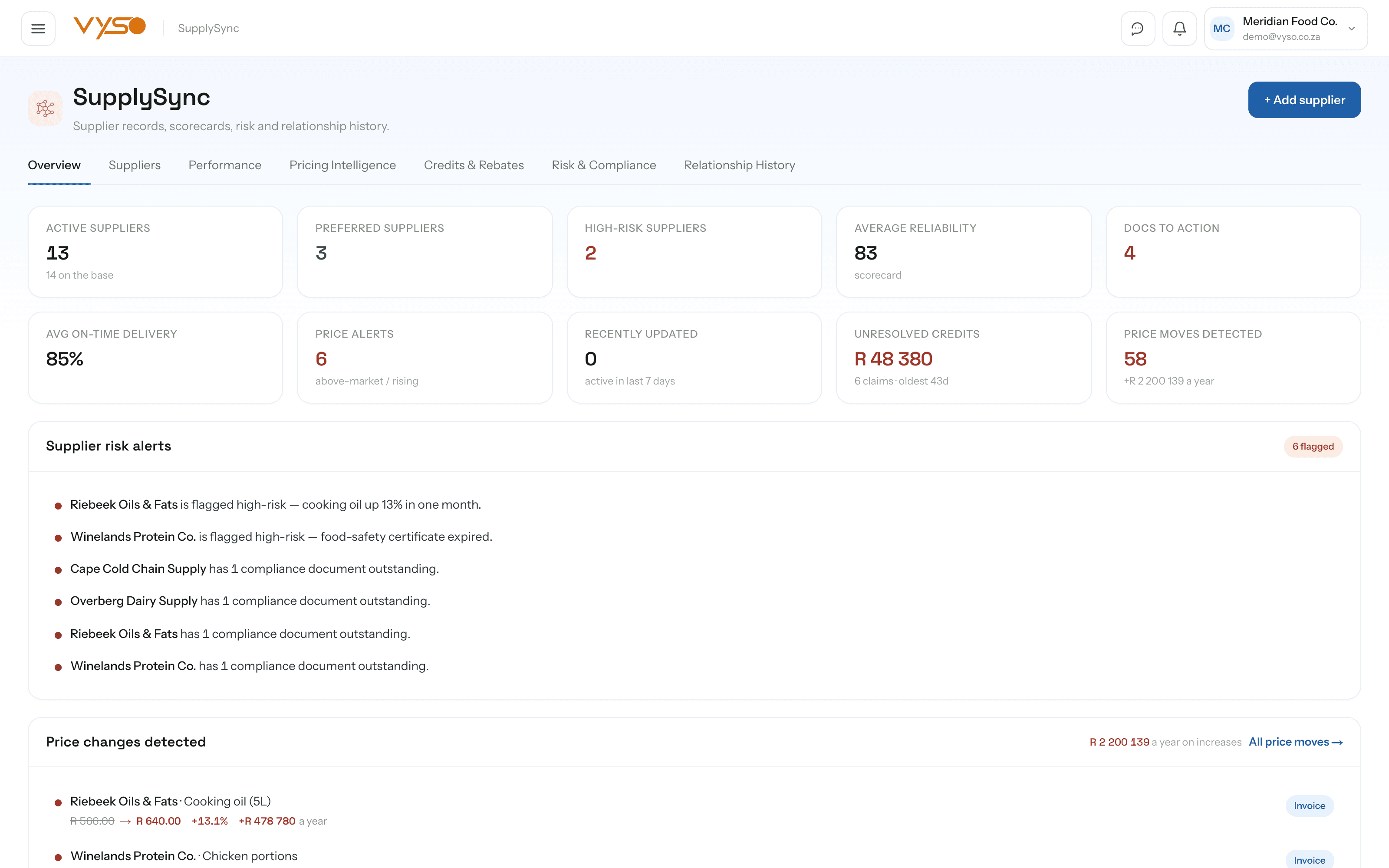
The overview is built for the question a buyer actually asks on a Monday: is anything about to go wrong. Risk alerts, price moves, documents needing action and the top suppliers' scorecards all sit on one screen, so you are not opening twelve supplier records to find the one that matters.

  • KPI tiles cover Active suppliers, Preferred suppliers, High-risk suppliers, Average reliability, Docs to action, Avg on-time delivery, Price alerts, Unresolved credits and Price moves detected
  • “Top suppliers” scores Overall, Reliability, Price stability, Delivery and Compliance side by side
  • Supplier opportunities carry a Buy now, Negotiate, Review or Watch badge with a link into the supplier record
  • A mobile snapshot strip shows the widgets the companion app surfaces — risk alerts, missing documents, credits owed and rebates outstanding
app.vyso.co.za/supplysync
SupplySync overview with supplier KPIs, risk alerts, detected price changes and a top suppliers scorecard table.

03

A directory you can actually filter

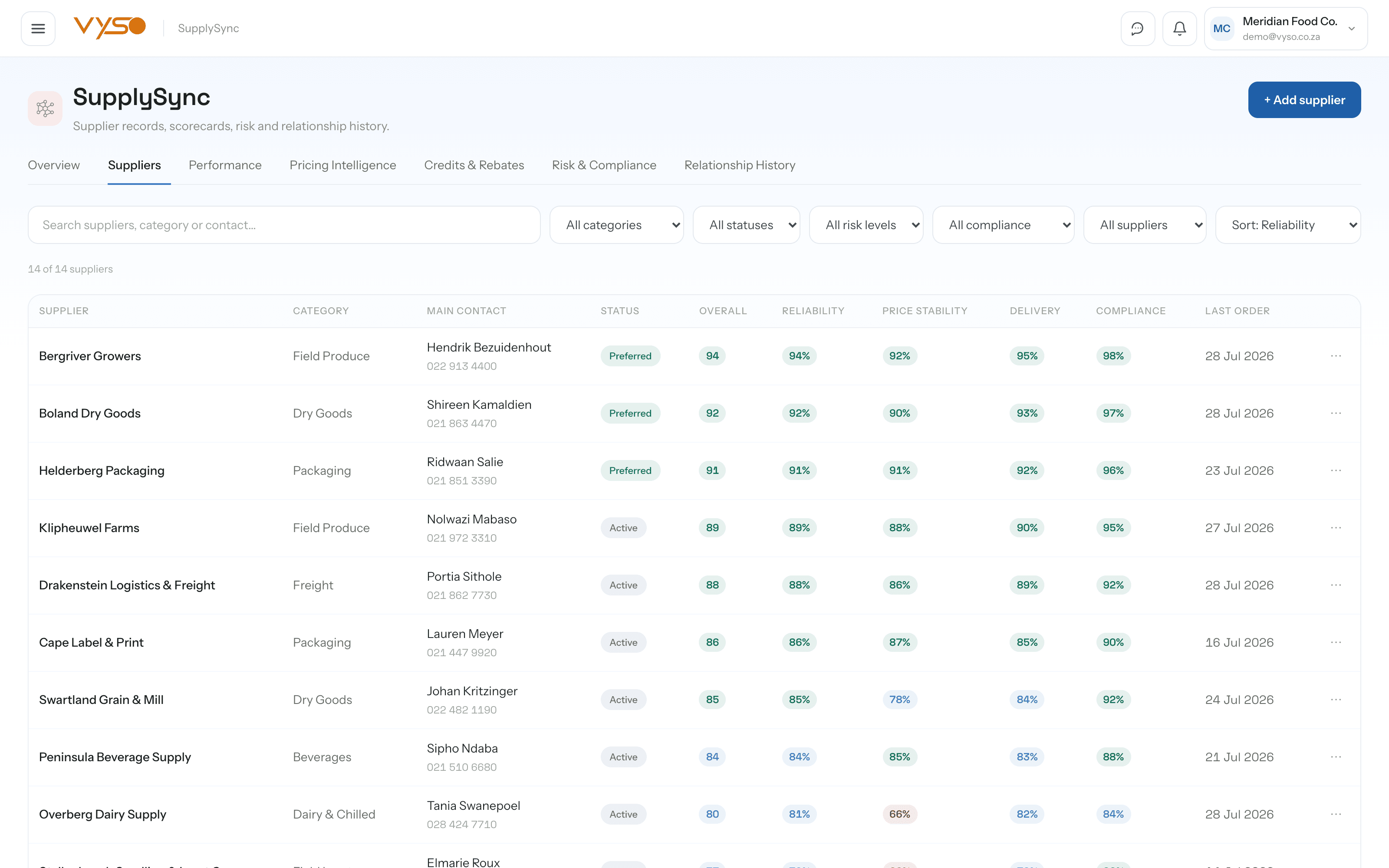
The supplier list carries the scorecard in the row, so triage happens without opening anything. Filter by category, status, risk level, compliance state or preferred-only, then compare up to three suppliers side by side when the choice is genuinely close.

  • Columns run Supplier, Category, Main contact, Status, Overall, Reliability, Price stability, Delivery, Compliance and Last order
  • Filters cover category, status (Preferred / Active / On review), risk level, compliance state and preferred-only, with sorting by reliability, last order, risk or overall score
  • The compare drawer puts up to three suppliers against each other on every metric plus price position and last issue
  • A supplier profile chains Supplier → Contacts → Documents → Performance → Pricing → Risk, with the Doc-U documents filed against them listed
app.vyso.co.za/supplysync/list
SupplySync supplier directory listing suppliers with category, contact, status and scorecard columns.

04

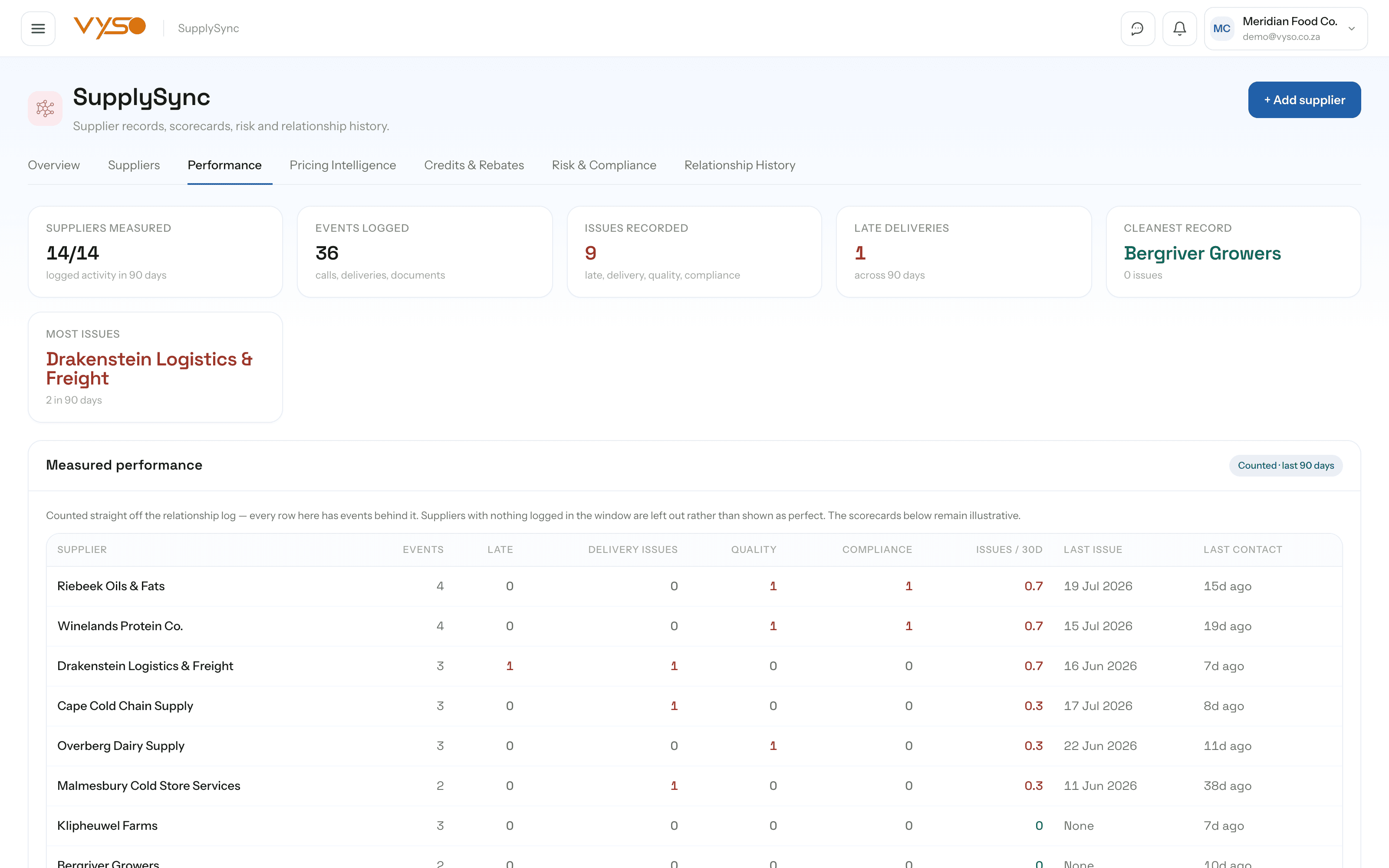
Measured performance, kept separate from the model

Most supplier scorecards are a model dressed up as a fact. SupplySync splits them: a “Measured” section counts only what has genuinely been logged in the relationship record, and the wider scorecard view is badged Illustrative. Suppliers with nothing logged are left out rather than shown as perfect.

  • The measured table counts Events, Late, Delivery issues, Quality, Compliance, Issues / 30d, Last issue and Last contact per supplier
  • Scorecards score Overall, Reliability, Quality, Delivery, Price stability, Responsiveness and Compliance with a trend sparkline
  • Trend charts are captioned as shaped by live supplier data rather than presented as a measured series
  • Highlights call out Best overall, Most improved, Most at risk, Most reliable and Most price-stable
app.vyso.co.za/supplysync/performance
SupplySync performance screen with measured supplier events and illustrative scorecards side by side.

05

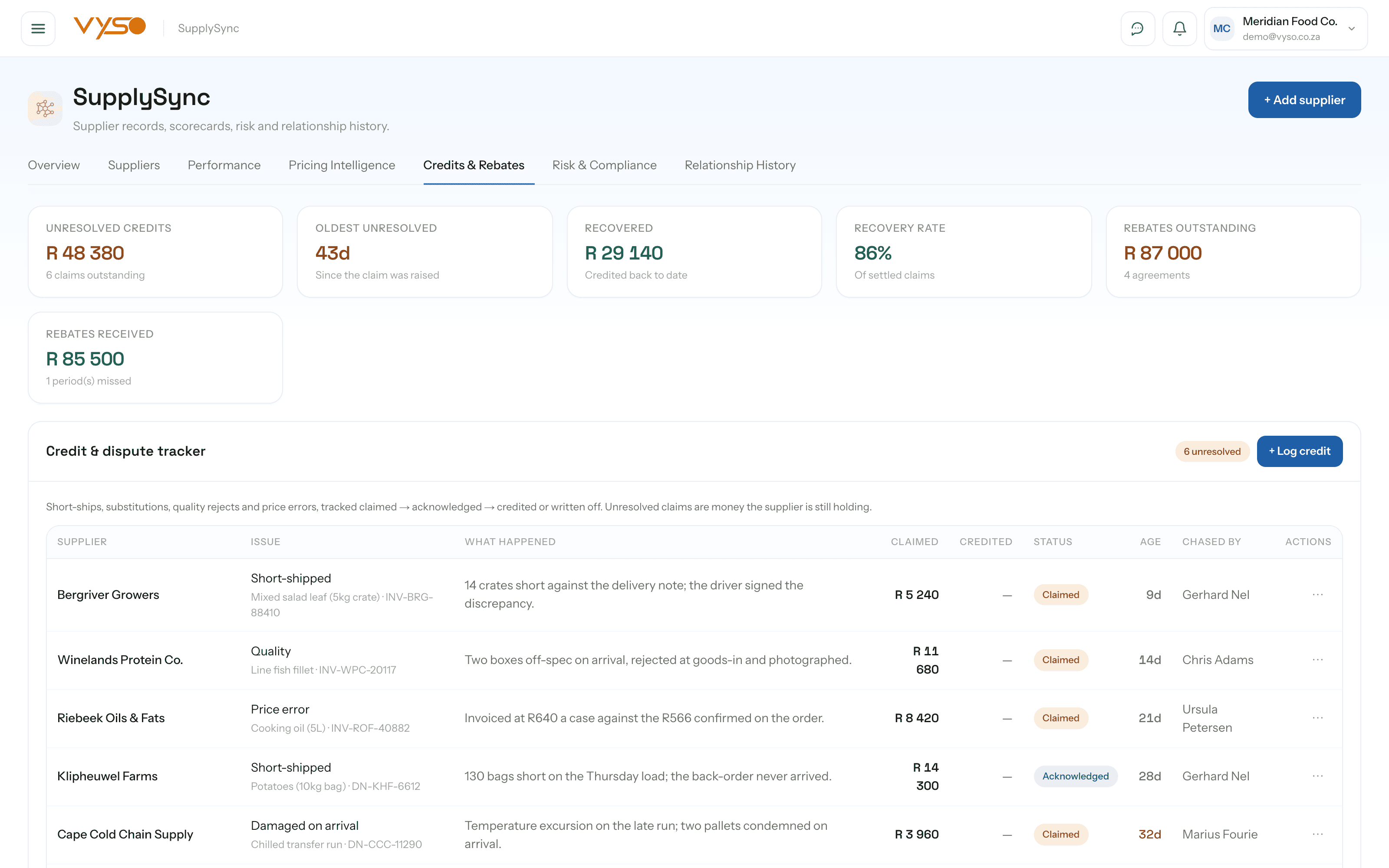
The money the supplier is still holding

Short-ships, quality rejects and price errors usually live in a WhatsApp thread and then nowhere. The credit tracker turns each one into a claim with an age on it, chased through to credited or written off — and rebate agreements get the same treatment, tracked as expected against actually received.

  • Credit rows carry Supplier, Issue, What happened, Claimed, Credited, Status, Age and Chased by, moving through claimed → acknowledged → credited or written off
  • KPIs cover Unresolved credits, Oldest unresolved, Recovered, Recovery rate, Rebates outstanding and Rebates received
  • Rebate agreements support percentage-of-spend or flat basis, with a qualifying threshold, period and expected amount
  • Each rebate shows received against expected as a progress bar, with individual receipts recorded against it
app.vyso.co.za/supplysync/credits
SupplySync credits and rebates screen showing the credit dispute tracker and rebate agreement progress.

06

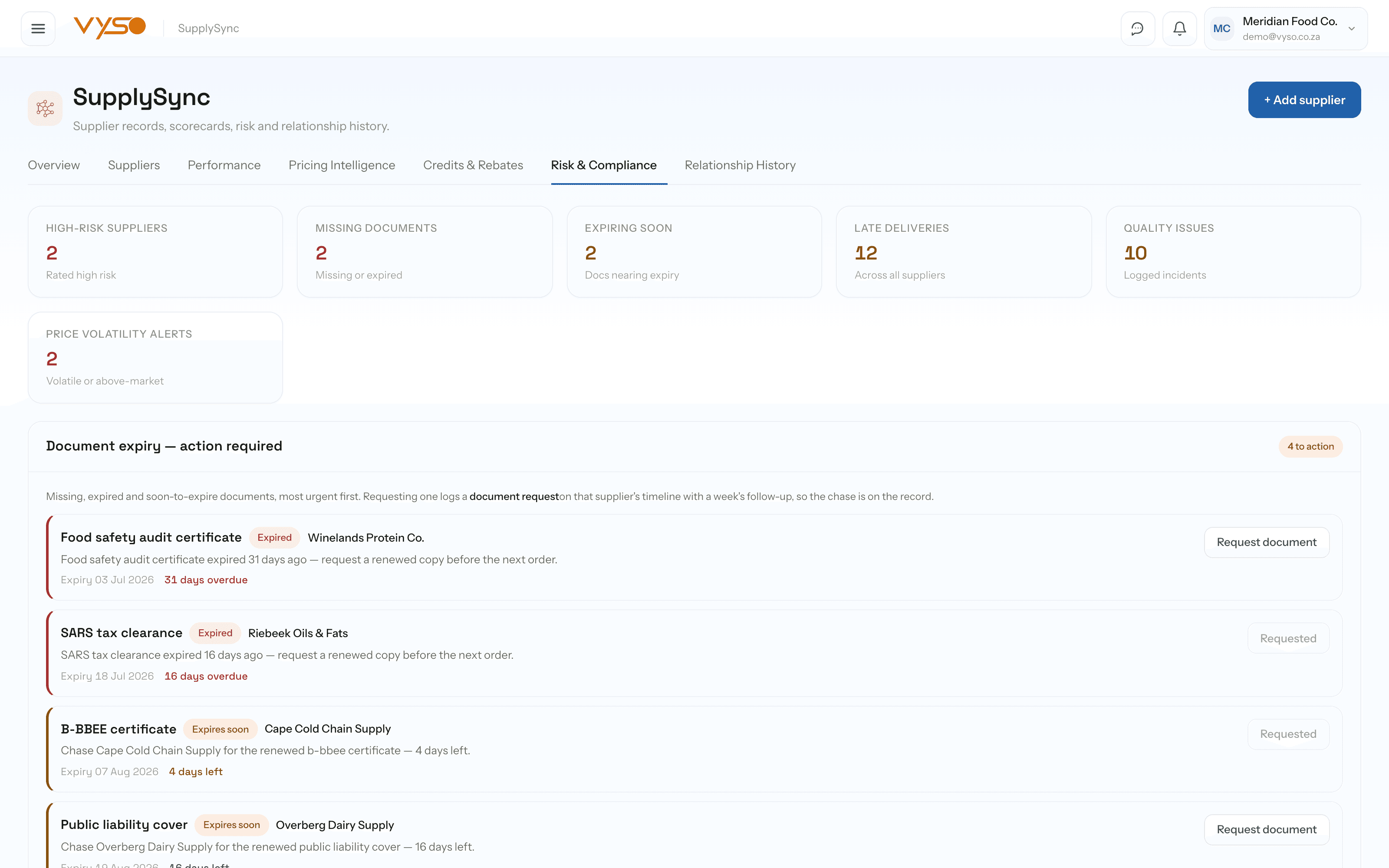
Compliance documents that chase themselves

Tax clearances, insurance, BEE certificates and food-safety documents expire quietly and become urgent at the worst moment. The document worklist ranks them by urgency and, when you press Request, writes a real document-request event onto that supplier's timeline with a follow-up due in seven days — rather than leaving the chase in someone's head.

  • Documents are badged Missing, Expired, Expires soon or Renewal due, with the expiry date and days remaining
  • The risk register lists Supplier, Risk type, Severity, Description, Suggested action, Owner, Status and Due date, moving through start, resolve or ignore
  • KPIs cover High-risk suppliers, Missing documents, Expiring soon, Late deliveries, Quality issues and Price volatility alerts
  • “Request” logs the chase on the record; nothing depends on remembering that you sent an email
app.vyso.co.za/supplysync/risk
SupplySync risk and compliance screen with a document expiry worklist and a supplier risk register.

07

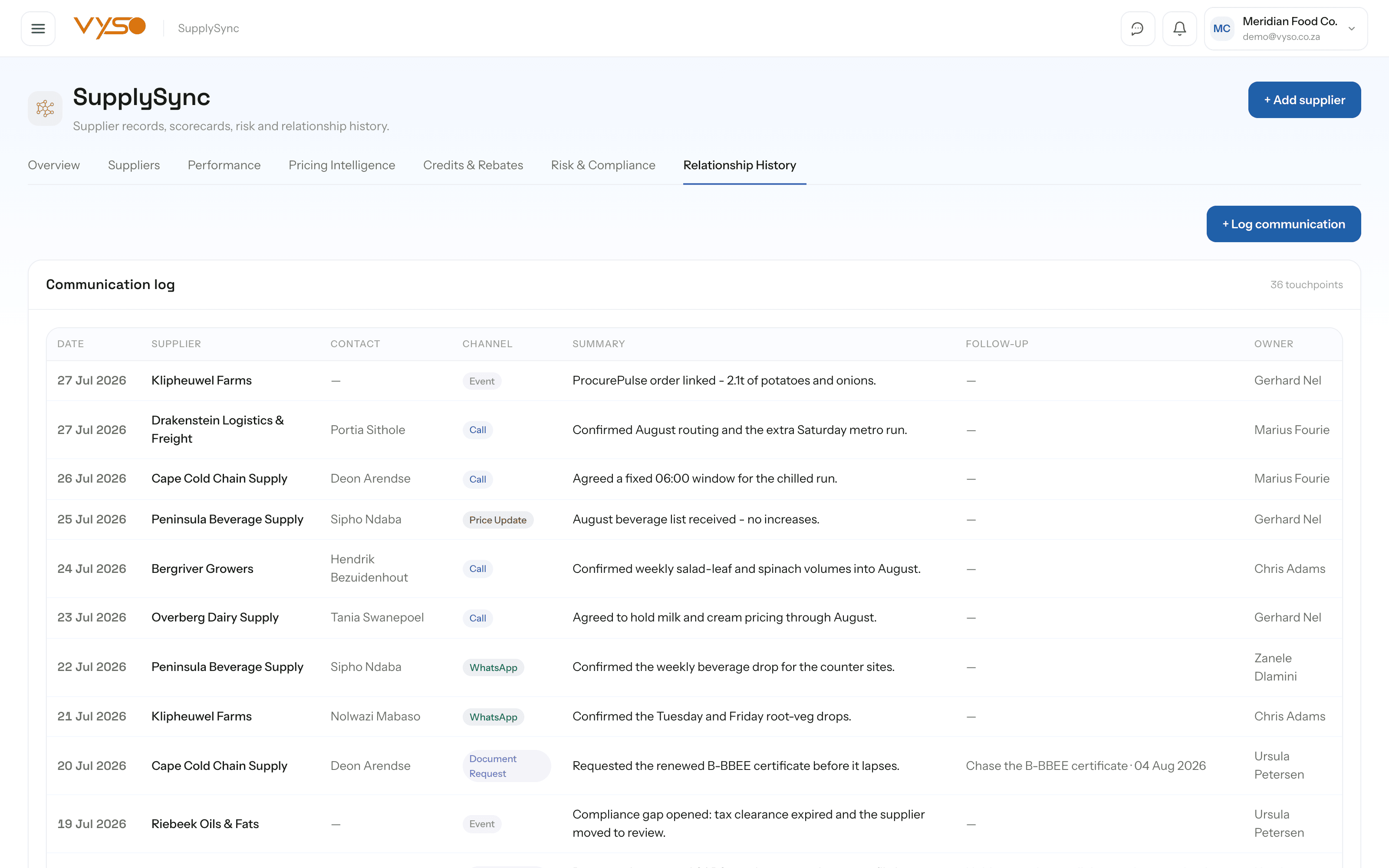
Every conversation, with the follow-up tracked

Supplier relationships live in call histories and message threads that leave with the person who had them. Relationship history logs each touchpoint against the supplier — channel, summary, contact, owner — and turns the follow-up into something with a due date rather than an intention.

  • The communication log runs Date, Supplier, Contact, Channel, Summary, Follow-up and Owner
  • Channels cover call, WhatsApp, email, meeting, price update, document request, complaint and delivery issue
  • Follow-ups are colour-coded overdue, due today or due later, and closed off with “Mark done”
  • A notes board keeps the latest notes per supplier so context survives a staff change
app.vyso.co.za/supplysync/history
SupplySync relationship history showing the communication log, notes board and outstanding follow-ups.

How it fits your week

The routine, not the feature list.

Software only helps if it changes what someone actually does on a Tuesday. This is the working rhythm SupplySync is built around.

  1. Let the documents build the record

    Every invoice and price list Doc-U reads updates that supplier's profile, spend rollup and price history. The supply base builds itself from paperwork you were handling anyway.

  2. Check the price moves first

    Detected increases carry their annualised impact, so a three percent line is either fine or a conversation — and you know which before you have it.

  3. Chase what is owed to you

    Log the short-ship or quality reject as it happens, then work the credit ledger by age. Rebates get tracked as expected against received rather than trusted.

  4. Clear the compliance worklist

    Request the expiring certificate from the worklist. The request is logged on the supplier's timeline with a seven-day follow-up attached.

  5. Buy in ProcurePulse

    SupplySync tells you who to buy from and why; the purchase order itself is raised in ProcurePulse. The two are deliberately not the same screen.

Straight answers

SupplySync questions, answered honestly.

Including the parts that are still on the roadmap. You should be able to plan around what exists today, not around a promise.

Can we place orders with suppliers from SupplySync?

No, deliberately. SupplySync surfaces pricing, scores performance and recommends who to buy from; the purchase order itself is raised in ProcurePulse. The module links you there rather than keeping a second buying workflow.

Do we have to fill in supplier scorecards by hand?

No. There are two tracks: a scorecard model badged as illustrative, and a separate measured-performance section that counts only what has genuinely been logged — calls, deliveries, quality issues. Suppliers with nothing logged are left out rather than shown as perfect.

How does it know a supplier's price changed?

It reads the invoices and price lists Doc-U has already extracted, compares each item against its own history and the market average, and flags material moves with a severity and an annualised rand impact.

Can it track credits we're owed and rebate agreements per supplier?

Yes. Credits run claimed → acknowledged → credited or written off with an age on each claim, and rebate agreements — percentage-of-spend or flat — track expected against received with individual receipts recorded.

Does it chase expiring compliance documents?

It gives you a prioritised worklist of missing, expiring and expired documents, and pressing Request writes a real document-request event onto that supplier's timeline with a seven-day follow-up — so the chase is on the record, not in someone's memory.

Related solutions.

See it on your own operation

Show us where supplysync would fit in your workflow.

We will map the actual workflow, identify the highest-value gap and tell you honestly whether Vyso is the right system to address it.