Doc-U.Turn incoming documents into reviewable data, not retyped data.
Doc-U captures operational documents — supplier invoices, statements, delivery notes, price lists and customer orders — and turns their fields and line items into structured, reviewable data instead of manual recapture.
Every screen below was captured from the running platform with a demo organisation — not drawn as a mockup. The labels, columns and tiles are the ones your team would work in.
01
Three ways in, one filing system
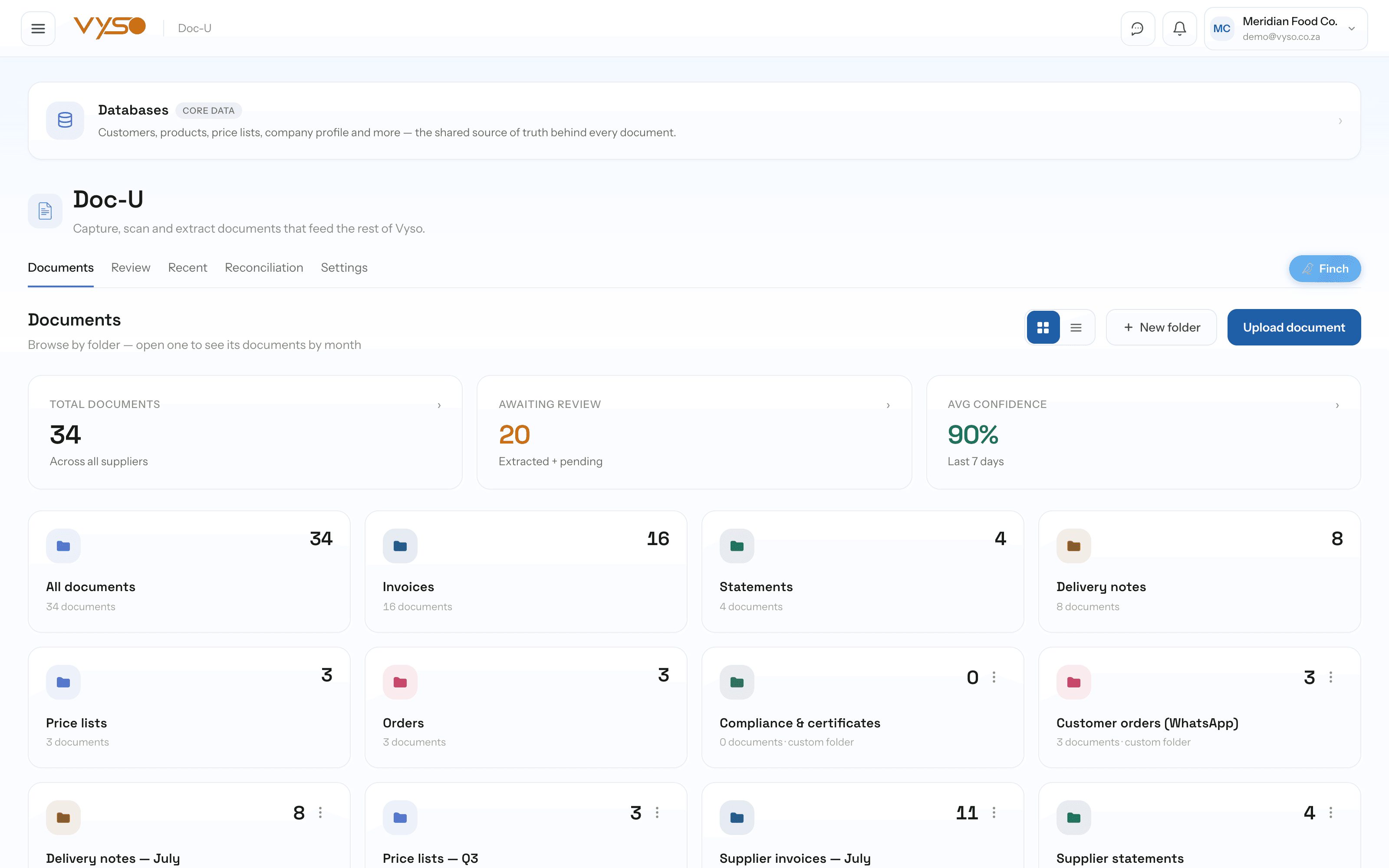
A document can be uploaded by hand, forwarded to your organisation's own intake address, or handed to the assistant in chat — and all three land in the same place, extracted the same way. The hub organises them by folder and month rather than as one endless list, with the counts that matter sitting above it.
Default folders for Invoices, Statements, Delivery notes, Price lists and Orders, plus any custom folders you add
KPI tiles show Total documents, Awaiting review (extracted + pending) and Avg confidence over the last 7 days
Uploads accept PDF, JPG or PNG up to 20MB and start extracting immediately
Every inbound email is recorded once and only once, so a forwarded document can't be processed twice
02
A queue of what still needs your eyes
“Awaiting review” filters the archive down to documents that have been extracted or are still processing but haven't been signed off. It is the working list — not the whole library — so the question each morning is “what's left”, not “what came in”.
Scoped to documents at extracted or pending status, with the same search, filter and upload controls as the hub
Rows carry the document type, supplier, date, line count and confidence percentage at a glance
A separate Confidence view re-sorts everything lowest-confidence-first, so the riskiest reads surface without hunting
The Review tab in the module bar carries a live count whenever the queue isn't empty
app.vyso.co.za/docu/awaiting
03
Nothing updates your stock or invoices until you save
Automated intake only works if you trust it, so the rule is written into the code rather than the marketing. Documents that arrive by email are held, uncommitted, in a review queue until an owner or admin presses Save. Uploads a person made themselves commit inline, because a human was already there.
The review queue states it plainly: nothing updates your stock, orders or invoices until you Save
Save and Discard are owner/admin actions — everyone else sees the queue but can't commit it
Two people can't double-commit the same document; the save is claimed atomically, and a stalled claim is safely retried after five minutes
Discarding a document leaves the queue without touching anything downstream
04
Confidence you can inspect field by field
An overall confidence score tells you very little when the total is right and the invoice number is wrong. Doc-U breaks the read into seven separate categories with a coloured bar each, and tells you how many fields fell below 90% so you know exactly where to look.
Scored separately for Supplier, Invoice number, Date, Total amount, Line items, VAT / tax and Document type
Bars run green at 90% and above, amber from 70%, red below — with a footer note counting the fields worth a check
Rule-based flags call out a Duplicate invoice, an Unknown supplier, a Credit note detected or a Low-confidence extraction
The extracted data sits beside the original file — image or PDF — so you're correcting against the source, not from memory
app.vyso.co.za/docu/confidence
05
Supplier statements reconciled without retyping totals
Statement reconciliation is the job nobody wants and everybody does by hand. Doc-U parses the transaction summary off each uploaded statement, groups them by the month on the statement, and shows a Check column that either balances or tells you by how much it doesn't.
Columns run Date, Supplier, Opening, Payments, Purchases, Pallet refunds, Pallet usage, VAT, Closing and Check
Check shows a tick when the statement balances, or the discrepancy in red when it doesn't
Each month exports to CSV for your bookkeeper in one click
A banner counts statements whose totals haven't parsed yet, so a gap is visible instead of silent
app.vyso.co.za/docu/reconciliation
06
Core Data: the records every document is matched against
Extraction is only as good as what it can match to. The Databases surface holds the shared master records — customers, contacts, delivery addresses, products, price lists, payment terms, VAT rates, company profile and document templates — and states on each card which downstream module consumes it.
Nine entities with live row counts, each editable in its own dedicated screen
Customers, contacts, addresses, products and price lists import from an Excel or CSV export
The importer maps your columns onto Vyso's fields in a grid, and saves nothing until you confirm
Company profile and banking details flow straight through onto OrderFlow invoices, quotes and delivery notes
app.vyso.co.za/docu/databases
How it fits your week
The routine, not the feature list.
Software only helps if it changes what someone actually does on a Tuesday. This is the working rhythm Doc-U is built around.
1
Forward the post to one address
Supplier invoices, statements and delivery notes go to your organisation's intake address as they arrive. Nobody files them; they file themselves into the right folder and month.
2
Extraction does the typing
Fields and line items come out structured, with a confidence score per category and the original file kept alongside for comparison.
3
Clear the queue once a day
Work “Awaiting review” or the confidence-sorted list, fix what needs fixing, and press Save. That press is the moment anything downstream changes.
4
Data lands where the work happens
Saved documents feed stock into ProcurePulse and supplier history into SupplySync; customer orders become priced OrderFlow orders.
5
Reconcile statements at month end
Open Reconciliation, check the balancing column, and export the month as CSV instead of rebuilding the summary by hand.
Works with the rest of Vyso
Connected where the workflow needs it.
These are real data relationships, not a logo wall. Each one describes what actually moves between Doc-U and the module beside it.
Including the parts that are still on the roadmap. You should be able to plan around what exists today, not around a promise.
Will an emailed attachment automatically change our stock or invoices?
No. Documents that arrive by email are held at extracted status in the review queue and commit nothing until an owner or admin presses Save. Only uploads a person made themselves commit inline, because someone was already looking at them.
What happens if two people approve the same document at once?
Only one save proceeds. The commit is claimed atomically on the document record, so the second press is a no-op rather than a duplicate. If a commit crashes mid-way, the stale claim is released after five minutes and can be retried safely.
Can we see how confident the extraction was about specific fields?
Yes. The confidence breakdown scores seven categories separately — supplier, invoice number, date, total amount, line items, VAT and document type — with a colour band per field and a count of how many fell below 90%.
How does Doc-U decide whether to auto-invoice a customer order?
It is confidence-gated. An order only auto-invoices when the matched customer clears their confidence threshold — 80 by default, overridable per customer — and every line has a resolvable price. Anything else is held as a draft for a person to confirm.
Can we reconcile supplier statements without retyping the totals?
Yes. Uploaded statements are grouped by the month on the statement with opening and closing balances, payments, purchases, pallet fees and VAT parsed out, unbalanced statements flagged, and a CSV export per month.