ShiftBoard.Labour deployment, visible alongside the rest of the operation.
ShiftBoard plans the week's shifts with the labour cost showing as you build it, replaces WhatsApp shift-swapping with a proper propose-accept-approve flow, and puts labour cost next to the sales it produced.
Every screen below was captured from the running platform with a demo organisation — not drawn as a mockup. The labels, columns and tiles are the ones your team would work in.
01
Build the week with the cost showing
Most rosters tell you the cost after payroll runs. Here the labour cost sits in the grid's footer row as you plan — per day and for the week — and the shift editor shows length, rate and shift cost before you save it. Conflicts like overtime risk, a short department, a leave clash or a double booking surface while you can still fix them.
The weekly grid runs Staff across the days plus an Hours column, with a Labour cost footer per day and for the week
The shift editor sets status Working, Off or Leave with start and end times, department, and an overtime notice where it applies
“Release shift & open cover” or “Mark call-out” turns a gap into an open shift instead of a phone call
An AI-drafted roster is on the roadmap and labelled coming soon in the app — the planning today is yours
app.vyso.co.za/shiftboard/roster
02
Call-outs and swaps that leave a trail
The usual failure is a verbal arrangement that nobody wrote down and the roster never reflected. ShiftBoard makes it a workflow: an open shift produces a ranked shortlist of eligible staff with the reason anyone was excluded, and a swap goes propose → accept → manager approval, with only that final approval rewriting the roster.
The cover drawer splits candidates into eligible and not available, and shows why each blocked person was excluded rather than silently dropping them
Candidate rows show the shift cost of using that person plus match chips for skill, availability and overtime
The swap centre tracks open and settled requests, with record-a-taker, approve-and-update-roster, decline and cancel
A verbal arrangement can never silently change who is on shift — only the approval writes to the roster
03
Clock-ins, hours and timesheets in one ledger
Attendance is the day's actual against the day's plan — who was scheduled, who clocked in, when, and what that means for hours and overtime. Managers correct it in place rather than in a side conversation, and approve timesheets from the same row.
Columns run Employee, Department, Scheduled, Clock in, Clock out, Hours, Overtime and Status
KPIs cover Clocked in, Late today, Absent today, Overtime hours this week and Pending timesheets
Row actions mark someone absent or approve their timesheet directly on the record
The ledger stays the source for hours worked rather than a separate payroll spreadsheet
app.vyso.co.za/shiftboard/attendance
04
Who can actually do the job
Cover decisions are only as good as what the system knows about your people. Each profile carries a skills matrix, availability, contracted versus actual hours, attendance score, leave balance and hourly rate — which is what makes a cover shortlist meaningful rather than alphabetical.
The directory lists Name, Department, Status, Next shift, Hours / wk, Attendance and Device
The skills matrix scores Receiving, Dispatch, Prep Kitchen, Driving, Customer Service, Stock Handling and Device Operation
Availability records available and unavailable days plus preferences, feeding straight into cover eligibility
Assigned WasteWatch devices are listed per person, tying an operator to the station they use
app.vyso.co.za/shiftboard/people
05
Labour cost against the sales it produced
Hours are an input; labour percentage is the number that tells you whether the week worked. Insights puts each day's rostered cost against that same day's invoiced sales from OrderFlow and colour-codes the result — and where there were no sales to compare against, it says so instead of inventing a percentage.
KPIs cover Labour cost this week, Rostered hours, Labour % of sales, Dearest day and Overtime hours
Labour % is the day's rostered cost divided by that day's invoiced sales: green under 25%, amber to 32%, red above
A cost-per-person table breaks the week down by employee, department, shifts, hours and cost
Money tiles are admin-gated, so managers can work the coverage view without seeing individual pay
app.vyso.co.za/shiftboard/insights
06
Today, in one screen
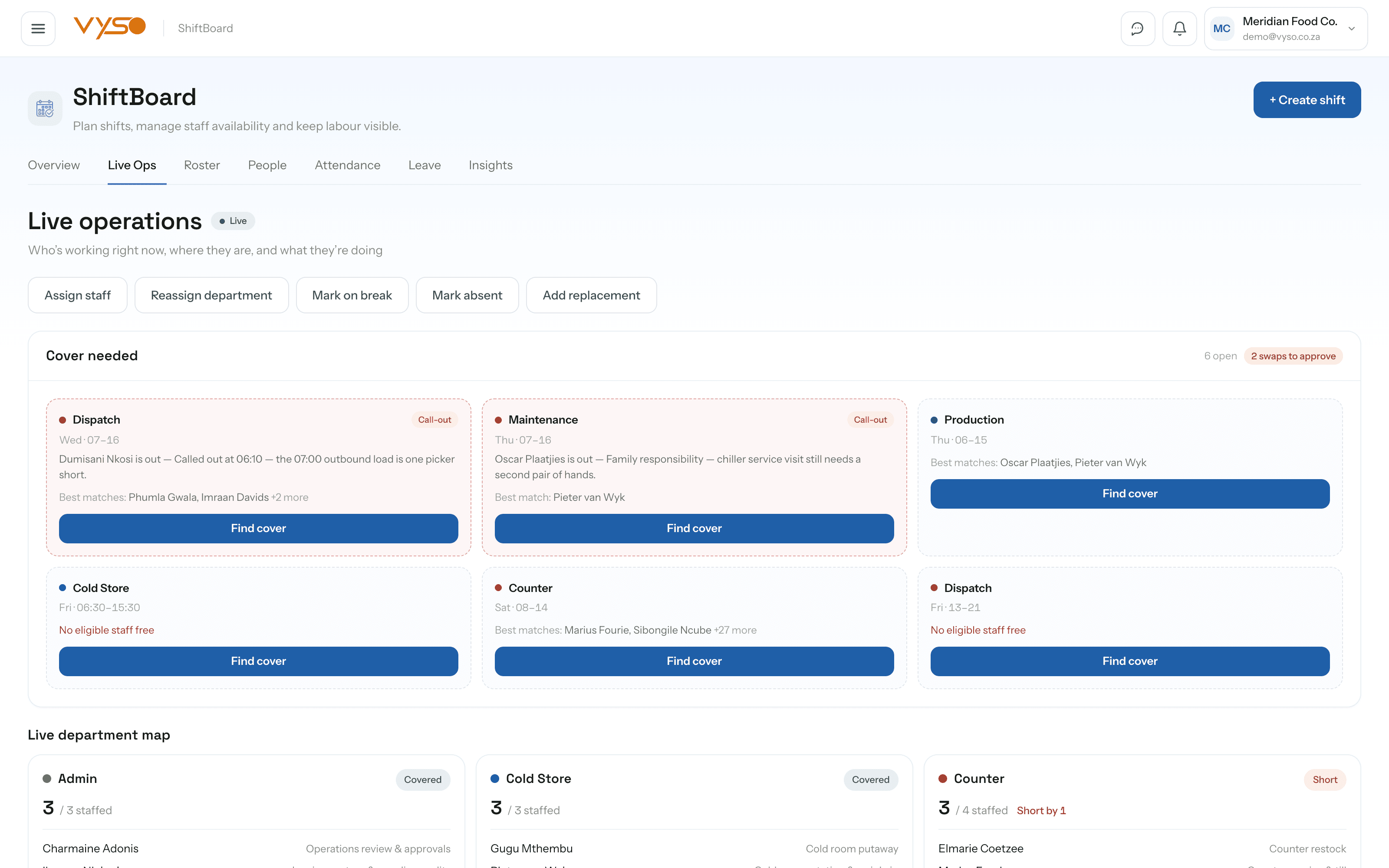
The overview answers who is on, what is uncovered and what it is costing — with the week's grid underneath and an alert list that deep-links into the module that can resolve each issue. Live Ops takes the same picture down to the minute for a second screen during service.
KPIs cover Staff on shift today, Currently working, Open shifts, Labour cost today, Overtime risk and Attendance issues
Today's staffing snapshot shows working against required per department with a coverage badge
Including the parts that are still on the roadmap. You should be able to plan around what exists today, not around a promise.
Does it calculate real labour cost, or just hours?
Real cost. Every shift is priced at the employee's hourly rate and rolled up per day, per week and per person — visible in the roster footer as you plan and in the cost-per-person table afterwards.
Can we see labour cost as a percentage of sales?
Yes, once OrderFlow has invoiced orders for the same day. Where there are no sales to compare against, the screen says so rather than showing a fabricated percentage.
How does shift swapping work — do staff just message each other?
It is a structured propose → accept → manager-approval flow, and only the approval step rewrites the roster. A verbal arrangement can never silently change who is on shift.
Does approving leave tell us if we'll be short-staffed?
Yes. Each request carries a coverage-impact note and risk level, and approving a high-risk request triggers a coverage warning naming the department it will leave short before it goes through.
Is there AI auto-scheduling?
Not yet. “Generate best roster” is visible in the app and explicitly marked coming soon — it is on the roadmap, not in your hands today. Everything else in the module is working.