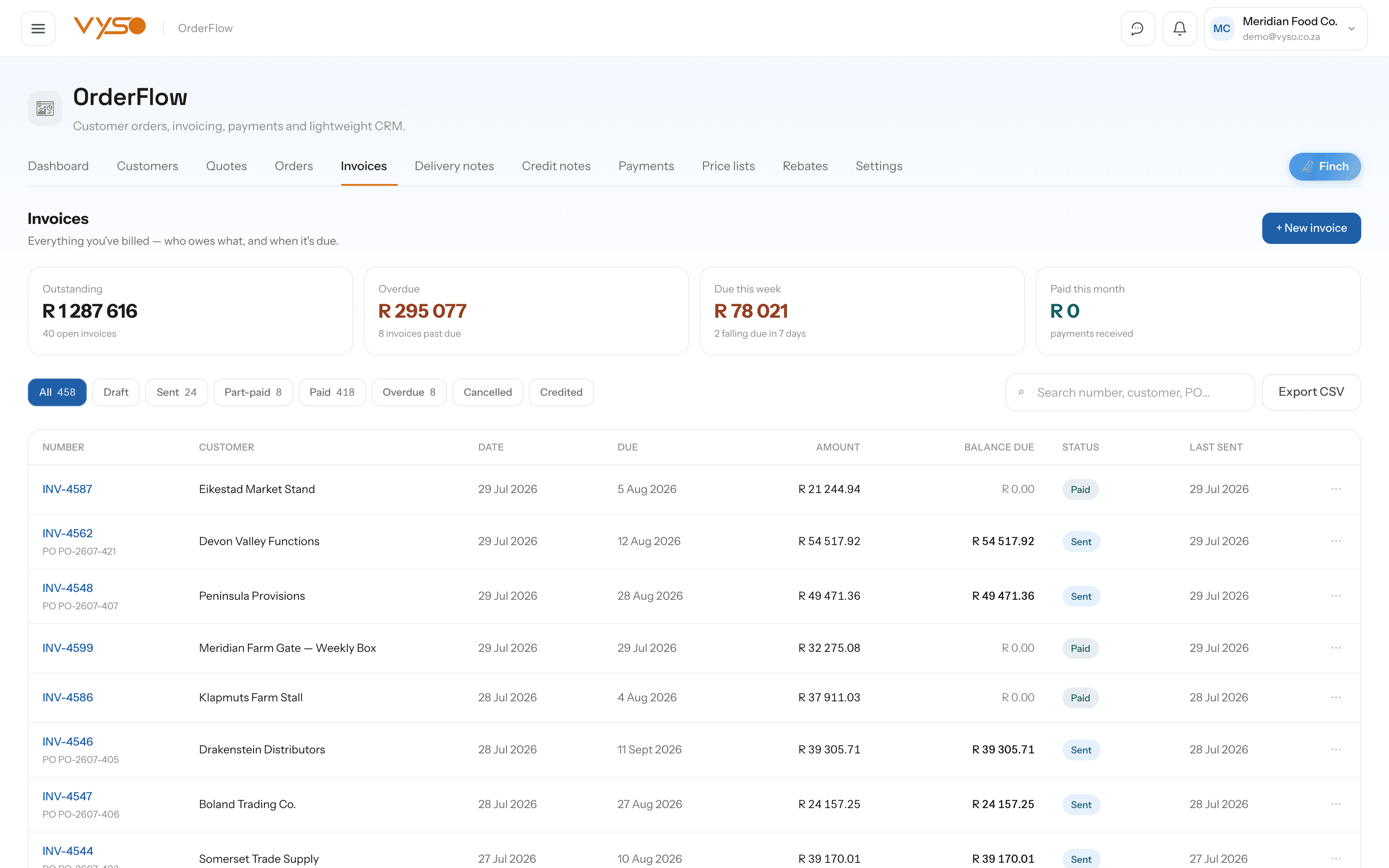
OrderFlow.From incoming order to fulfilment and invoicing in one flow.
OrderFlow connects the commercial work your team repeats every day: customers, quotes, orders, invoices, delivery documents, payments and price lists — inside one clear operating workflow, instead of the same commercial record being rebuilt at each step.
Every screen below was captured from the running platform with a demo organisation — not drawn as a mockup. The labels, columns and tiles are the ones your team would work in.
01
One screen that answers “where is our money?”
Most order books can tell you what was sold. The OrderFlow dashboard is built to tell you what is still owed and what is about to go late. Revenue this month carries a seven-month sparkline and a month-on-month delta, and the Outstanding tile splits what you're owed across an ageing bar rather than showing one unhelpful total.
The ageing bar on “Outstanding · owed to you” splits the balance into not yet due, 1–30, 31–60 and 60+ days overdue
Secondary chips track Quote requests, Quotes awaiting, Orders to invoice, Customers and Open invoices
Global search (⌘K) runs across customers, quotes, orders and invoices from anywhere in the module
Revenue and outstanding tiles are admin-gated, so members see the operational picture without the money
app.vyso.co.za/orderflow
02
Orders that arrive as a photo, not a form
Customers send orders the way that suits them — a WhatsApp screenshot, an emailed PDF, a photograph of a scribbled list. “↑ Upload order” pushes that file through Doc-U's extraction, matches the customer and every line against your catalogue, prices it and hands you back a real order. Anything the system is not confident about is held as a draft instead of being guessed at.
The KPI strip tracks Today's orders, Pending confirmation, Ready to invoice, Delivered today, Outstanding value and Avg order value
A clickable stepper moves an order Draft → Confirmed → Picking → Packed → Out for delivery → Delivered
Select rows for bulk “Generate invoices”, “Export CSV”, “Mark delivered” or “Cancel orders”
An uploaded order auto-invoices only when the customer match clears its confidence threshold and every line has a resolvable price
app.vyso.co.za/orderflow/orders
03
Website enquiries, triaged before they become work
Quote requests submitted through your public contact form land in a review inbox above the quotes list. Nothing is priced or linked to a customer until someone drafts the quote — and the enquirer's raw message sits read-only beside the builder rather than being pasted into a document that also carries your banking details.
Each request offers “Draft a quote” or “Dismiss”, with likely-spam rows flagged for a human to confirm or override with “Not spam”
KPIs cover Open quote value (draft + sent), Awaiting decision and Accepted this month
A drafted quote converts straight to an order or an invoice without re-keying line items
Website request lines are deliberately not auto-priced — a person picks the product and therefore the price
app.vyso.co.za/orderflow/quotes
04
Every receipt against the invoice it settles
Payments is the single ledger of money actually received, reconciled against invoice balances rather than tracked in a separate spreadsheet. Recording a payment updates the invoice's balance panel, which breaks the total down through rebate, paid, credited and balance due.
The table carries Date, Customer, Invoice, Amount, Method, Reference and Receipt so proof of payment stays attached
KPIs show Received this month, Received today, Outstanding and Overdue invoices
Recording a payment is admin-gated and starts from an invoice picker, so receipts can't land on the wrong document
Credit notes raised against an invoice appear on the same balance panel, keeping the audit trail in one place
app.vyso.co.za/orderflow/payments
05
A customer record that learns how that customer orders
The customer book holds real financial standing, not just contact details — terms, credit limit, outstanding balance and last invoice. Open a profile and you also get the rules that make automation reliable for that specific account: how they write their order lines, which price basis to invoice on, and how confident the system must be before it invoices without you.
The list shows Customer, Type, Terms, Outstanding, Last invoice and Status; the profile adds Lifetime invoiced and Outstanding
“Order mappings” translate a customer's own wording — “FF - NAARTJIES Box” — to a clean catalogue item, invoice name and billing unit
Per-customer settings cover VAT treatment, price basis (your price list or the document's own price), prefix stripping and a payment-terms override
The auto-invoice confidence threshold is per customer, so a messy account can be held for review while a tidy one runs unattended
app.vyso.co.za/orderflow/customers
06
Credit notes and delivery documents that keep the trail intact
Reversing a sale is where most systems quietly lose the thread. In OrderFlow a credit note is a real document raised against a specific invoice, and cancelling an invoice reverts the linked order to confirmed and returns the stock it took out. Delivery notes work the same way — generated from an order or invoice, then closed off with proof of delivery.
Credit notes list Credit #, Customer, Against invoice, Issued, Total, Reason and Status, with Total credited and Credited this month above
Delivery notes filter by All, Draft, Out for delivery and Delivered, and capture a signed-by name on delivery
Proof-of-delivery files attach to the note itself, so the evidence lives with the document rather than on a phone
Cancelling an invoice explicitly reverses the stock movement it created — the reversal is part of the workflow, not a clean-up job
app.vyso.co.za/orderflow/credit-notes
How it fits your week
The routine, not the feature list.
Software only helps if it changes what someone actually does on a Tuesday. This is the working rhythm OrderFlow is built around.
1
Open the dashboard before anything else
The ageing bar tells you in one glance whether the problem this week is new sales or old money. Overdue reads “✓ nothing past due” when there genuinely is nothing to chase.
2
Take orders however they arrive
Photograph, forward or upload the customer's order and let extraction do the typing — or use Quick order with “↻ Repeat last order” for the accounts that buy the same thing every week.
3
Confirm, pick and dispatch
Move the order along its stepper, raise a delivery note as a picking slip, and close it off with a signed-by name and a proof-of-delivery file.
4
Invoice from the order, not from scratch
Generate the invoice off the order that already carries the customer, price list and rebate. Standing rebate percentages are snapshotted onto the invoice and deducted automatically.
5
Chase what is actually outstanding
Work the overdue bucket from Invoices, record receipts against the right invoice in Payments, and raise a credit note when something genuinely needs reversing.
Works with the rest of Vyso
Connected where the workflow needs it.
These are real data relationships, not a logo wall. Each one describes what actually moves between OrderFlow and the module beside it.
Including the parts that are still on the roadmap. You should be able to plan around what exists today, not around a promise.
Can staff photograph or forward a customer's order instead of typing it in?
Yes. “↑ Upload order” accepts a PDF, photo or WhatsApp screenshot. Doc-U extracts the line items, OrderFlow matches the customer and products against your records, prices the lines and creates the order — auto-invoicing it when the match is confident enough.
Will it invoice the wrong customer or price off a messy order?
No. Auto-invoicing only fires when the customer-match confidence clears a threshold (80 by default, configurable per customer) and every line has a resolvable price. Anything short of that is held as a draft order and routed to Doc-U review for a person to confirm.
Does selling something in OrderFlow update stock automatically?
Yes. The moment an order is invoiced, a negative “sale” movement is logged against each line and on-hand quantities drop in ProcurePulse. Cancelling the order or the invoice reverses the movement rather than leaving stock understated.
What happens to quote requests from our website contact form?
They land in a dedicated review inbox above the quotes list. Likely spam is flagged for a human rather than filtered away, and nothing is priced or attached to a customer record until someone drafts the quote.
Can we connect OrderFlow to Xero?
There is a Xero connection an owner or admin can authorise under Settings, but invoice and payment syncing is not wired to it yet. We would rather say that plainly than let you plan around a sync that does not exist today.